
Skip to content
StarHela

StarHela Provides TikTok and YouTube Videos, Ad clicks, Blogging, Surveys, premium Forex tutorials, enlightening e-books, and competitive chess and draughts games to boost your earnings.

  • Home
  • About StarHela
  • Contact us | StarHela
  • FAQ
  • How to Register StarHela – Step‑by‑Step Guide
  • Privacy Policy – StarHela
  • StarHela – Activation Fee
  • StarHela – How It Works, Registration, Login, and Earning Opportunities Explained
  • StarHela is Legit – Here is why | StarHela – Registration, Login & Earnings Guide
  • StarHela Legitimate Verification
  • Terms & Conditions – StarHela
  • Home
  • About StarHela
  • Contact us | StarHela
  • FAQ
  • How to Register StarHela – Step‑by‑Step Guide
  • Privacy Policy – StarHela
  • StarHela – Activation Fee
  • StarHela – How It Works, Registration, Login, and Earning Opportunities Explained
  • StarHela is Legit – Here is why | StarHela – Registration, Login & Earnings Guide
  • StarHela Legitimate Verification
  • Terms & Conditions – StarHela
SIGN UP STARHELA
  • Home
  • Register StarHela
  • Create StarHela Account
Posted inRegister StarHela

Create StarHela Account

Posted by By StarHela
Create StarHela Account

✈️ How to Create a StarHela Account

💫 After clicking the link, you will be directed to a page similar to the one shown in the screenshot.
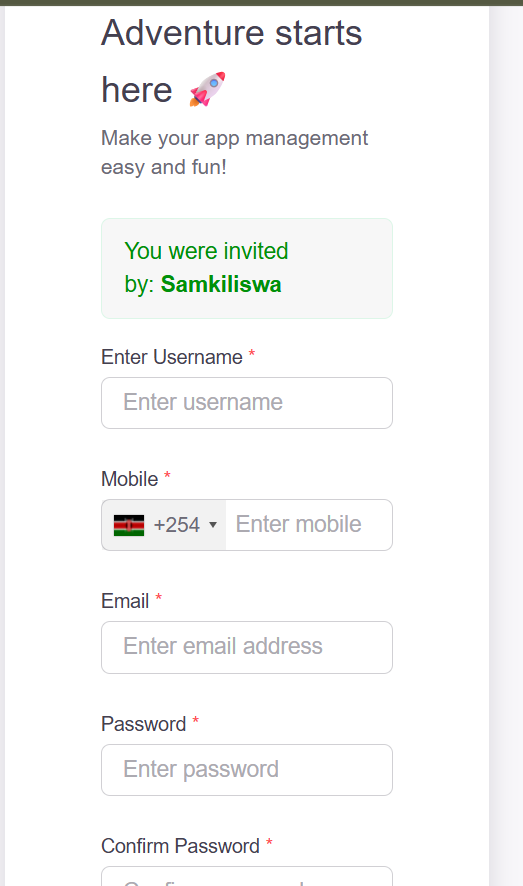
📲 Create StarHela Account

1. Enter Username
🔖 Choose a unique username (e.g. samkiliswa) that you can easily remember. You will use it every time you log in.

2. Enter Mobile Number
🔖 First select your country code, then enter your phone number without the country code.
Example: 794800571 or 114688883 (start with 7 or 1).

Is StarHela Legit

3. Enter Email Address
🔖 Input a valid email address and double-check it for accuracy. This will be used for password recovery and receiving StarHela earning notifications.

4. Create Password
🔖 Set a password with at least 4 characters (letters and/or numbers).
Example: 432G. Make sure it’s easy for you to remember.

5. Confirm Password
🔖 Re-enter the same password to confirm and proceed.

➡️ The country will be selected automatically once you enter your phone number.

➡️ Click the Create Account button to continue.

➡️ On the next page, you will see instructions on how to activate your StarHela account. After completing the steps, proceed to your StarHela dashboard.


StarHela Uganda – StarHela

Tags:
How StarHela worksIs StarHela LegitLogin StarHelaRegister StarHelaStar HelaStarHelaStarHela AgenciesStarHela AgencyStarHela App
Last updated on May 3, 2026
StarHela
View All Posts

Post navigation

Previous Post
StarHela StarHela
Next Post
Create StarHela Account Create StarHela Account
Copyright 2026 — StarHela. All rights reserved.