
✈️ Step-by-Step Guide: How to Create a StarHela Account
💫 Once you click the registration link, you will land on the sign-up page (as shown in the screenshot).
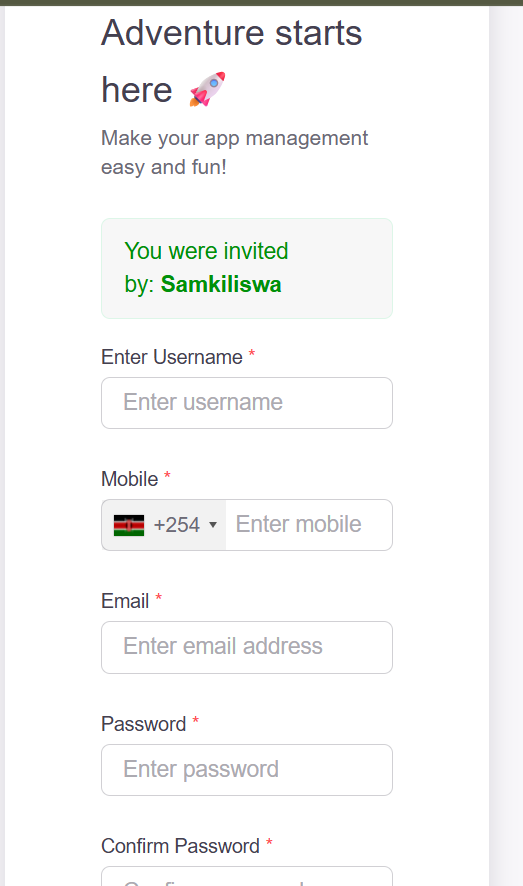
1. Username Setup
🔖 Enter a unique username of your choice (e.g. samkiliswa).
Make sure it’s easy to remember because you will use it when logging in.
2. Mobile Number Entry
🔖 Select your country code first, then type your phone number without the code.
Example: 794800571 or 114688883 (start with 7 or 1 only).
3. Email Address
🔖 Provide a valid email address and confirm it is correct.
This email will help you recover your password and receive StarHela earning updates.
4. Password Creation
🔖 Create a secure password with at least 4 characters (letters or numbers).
Example: 432G
Keep it safe and memorable.
5. Confirm Password
🔖 Re-enter the same password to verify and continue.
➡️ The system will automatically detect and set your country after entering your phone number.
➡️ Click the Create Account button to proceed.
➡️ You will then be taken to the activation page, where you complete the final steps before accessing your StarHela dashboard.